Help
Archiving and deleting


Archive what you've finished with. Delete only what you'll never need again.
Didji has two ways to clear something out of the way. Archive is for something you've finished with but might want one day: an old account, a car you've sold. Delete is for something you're sure you don't need. Both can be undone for a while, so neither is a leap in the dark.
- Open the record, and tap the button at the top right. A menu drops down.
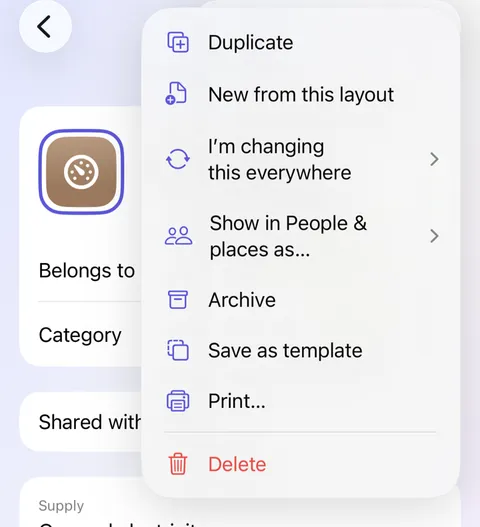
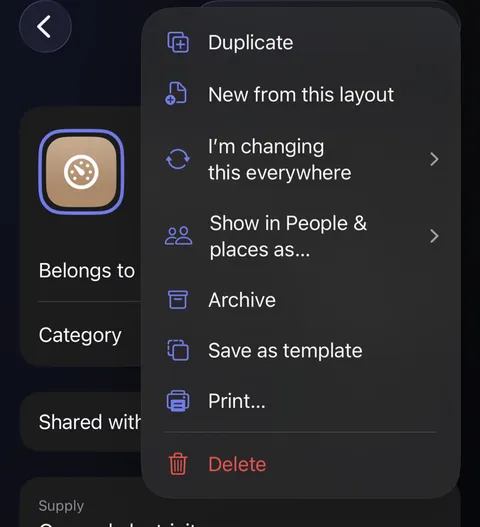
- Tap Archive to put it away, or Delete at the foot to send it to Recently Deleted. Didji checks with you before deleting.
- To find it again, scroll to the very bottom of the home screen. Below a thin line are two sections: Archive and Recently Deleted. Tap one to open it.
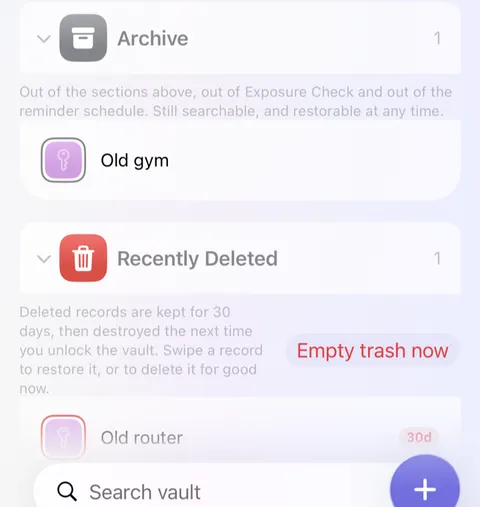
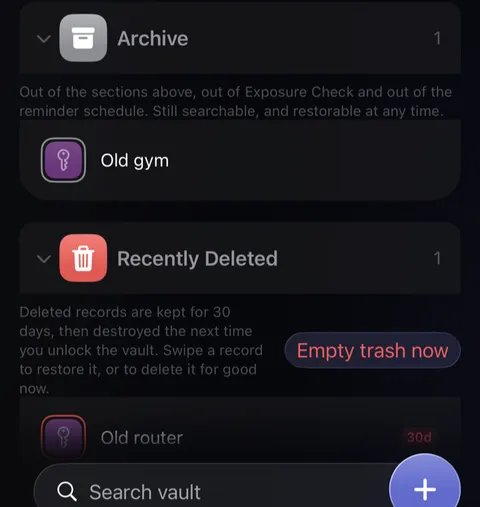
- To bring something back, open it and tap , then Restore from archive, or Put back for something deleted. In Recently Deleted you can also swipe a record to the right and tap Put back.
Good to know
- Archived records leave your lists, Exposure Check and reminders, but search still finds them.
- Deleted records wait in Recently Deleted for 30 days. The little badge counts the days left, then they're destroyed the next time you unlock, once that device has caught up with iCloud.
- In your list, swipe a record to the left and tap Archive or Delete for a quicker way, one record at a time. A person, pet or thing in People & Places is archived from its own screen, where Didji can offer to mark it as former instead.
- Delete for good and Empty Recently Deleted can't be undone, and take the record's documents and passkeys with them.
- Something archived and then deleted goes back to the archive when restored.
See also
Still stuck?
Write to us at hello@didji.app, and tell us which device you’re using if you can.
Never send a password or your recovery code to anybody, us included. What we can’t do for you.