Help
Coming from Apple Passwords


You already know AutoFill and Face ID. Everything else here is a bonus.
In Didji: Move to Didji
Where things are
- All: your list, sorted into categories
- Passkeys: passkeys, on the login they belong to; see Passkeys
- Verification codes: sign-in codes, filled by AutoFill the same way; see Sign-in codes
- Wi-Fi: Wi-Fi network records, shown as a QR code for a guest; see Wi-Fi
- Notes: notes on any record, and Secure note records of their own
- View History: History on every record, and Previous passwords; see Earlier versions of a record
- Deleted: Recently Deleted, for 30 days, at the foot of your list
- Security recommendations: Exposure Check: Found in breaches, Reused, Weak, and more; see Exposure Check
- Detect Compromised Passwords: Check for leaked passwords, under Privacy in Settings
- Hide (a recommendation): Ignore, a swipe on Exposure Check's lists
- Shared Group: sharing chosen records with people you've connected; see Sharing with someone
- Group Invitations: Didji's invitation, a code scanned once
- iCloud Keychain: it keeps Didji's key too, and your vault travels through your own iCloud; see Where your key lives
- AutoFill & Passwords: the same setting in iOS, with Didji turned on; see Filling in passwords for you
What came across
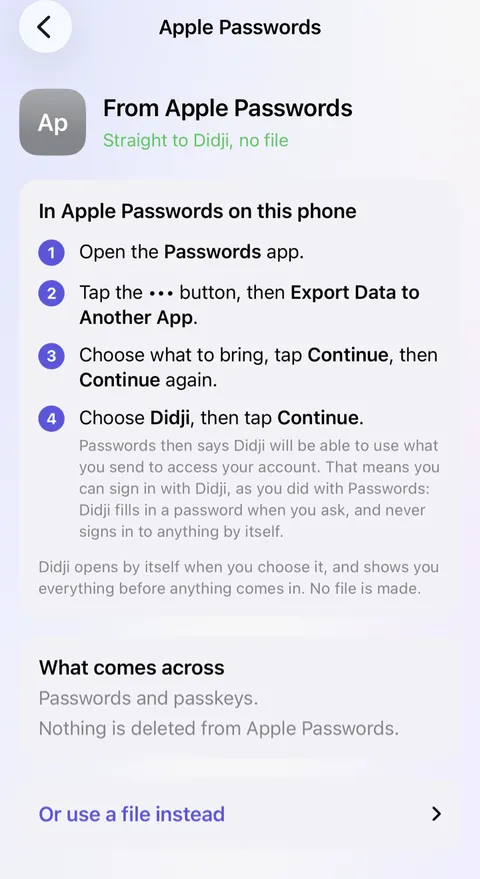
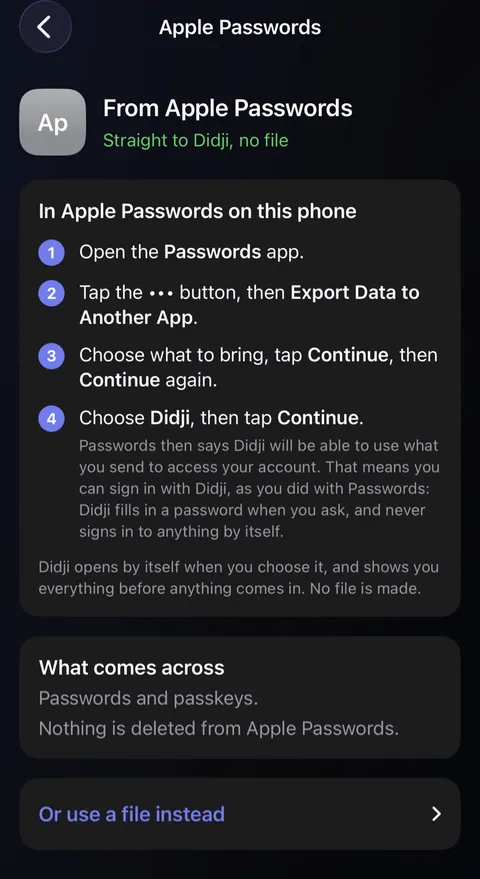
- Sent straight from Passwords, each password comes as a login, with its passkeys.
- Before it sends, Passwords says Didji will be able to use what you send to access your account. That means you can sign in with Didji, as you did with Passwords: Didji fills in a password when you ask, and never signs in to anything by itself.
- Wi-Fi networks stay in Passwords: add the ones you want with the Wi-Fi network template, or by scanning a network's QR code.
- Sign in with Apple stays with your Apple Account, where it works as before.
- From the file Safari makes instead, passwords, notes and verification codes come across. Your cards in that file stay behind; add them with the Payment card template.
- Nothing is copied twice. Sent straight from the app, a login already in Didji is merged with it, and where two passwords differ, the newer is used and the other kept on the same record. From a file, a login already here with a different password is kept beside it as a second record, and Didji says so: one of the two is probably out of date.
- Everything shows under Recently added for 30 days, dated the day you moved.
New in Didji for you
- Much more than passwords: passports, insurance, the car's paperwork and the boiler's service, each with its own fields; see Categories and templates.
- A page for every person, pet, car and home, with everything that belongs to them and what's due; see People & Places.
- Due soon and reminders on any date: a passport, an MOT, a warranty; see Reminders and Due soon.
- Essentials shows what people usually keep, and which of it isn't in Didji yet; see Essentials.
- Scans and PDFs kept inside records, and search that reads them; see Keeping a scan or a photograph inside a record.
- Payment cards drawn as cards, turning over to the numbers a checkout asks for; see Payment cards.
- Private Photos keeps photographs and videos in the vault, away from your camera roll; see Private Photos.
- Records on your Apple Watch, sign-in codes first; see The Apple Watch.
What works differently
- Sharing is a record at a time, with people you've connected in Didji, and only you can change what you share. The people you share with don't need to buy Didji; see What is shared, and what is not.
- A record goes only to people you've connected, never by AirDrop.
- Didji runs on iPhone, iPad and Mac. On a Windows computer, iCloud Passwords stays the way to your passwords.
- Your vault is locked with Didji's own key before it reaches iCloud, so it's yours alone even there; see How Didji keeps your secrets.
See also
Still stuck?
Write to us at hello@didji.app, and tell us which device you’re using if you can.
Never send a password or your recovery code to anybody, us included. What we can’t do for you.