Help
Coming from Bitwarden


Your logins, cards and notes are here, and your sign-in codes are part of the furniture.
In Didji: Move to Didji
Where things are
- Item: a record
- Login, Card, Identity, Secure note, SSH key: a login, a payment card, a Person, a secure note and an SSH key, each in its category
- Folders: categories and tags; see Vaults in Didji
- Organizations and Collections: sharing chosen records with people you've connected, and tags and Belongs to for grouping; see Sharing with someone
- Favorites: Favourites, a section at the top of your list; and Pin to top for up to three on the card above it
- Vault health reports: Exposure Check: Exposed Passwords is Found in breaches, Unsecured Websites is Not secure, Inactive 2FA is Could use a sign-in code, and Reused and Weak are themselves; see Exposure Check
- Authenticator key and Bitwarden Authenticator: sign-in codes, made and filled by Didji itself; see Sign-in codes
- Passkeys: passkeys, on the login; see Passkeys
- Password history: History on every record, and Previous passwords; see Earlier versions of a record
- Trash: Recently Deleted, for 30 days, at the foot of your list
- Archive: Archive, at the foot of your list
- Custom Fields: fields of any kind from Add field, any of them hidden
- File Attachments: scans, photos and PDFs inside any record; see Keeping a scan or a photograph inside a record
- Generator: the Password Generator: characters, words or a PIN; see Making a strong password
- Master password: nothing to remember: the key is kept in your iCloud Keychain, and Face ID opens Didji; see Where your key lives
- Emergency Access: your recovery kit, with its page for your family; see So that my family can find things
What came across
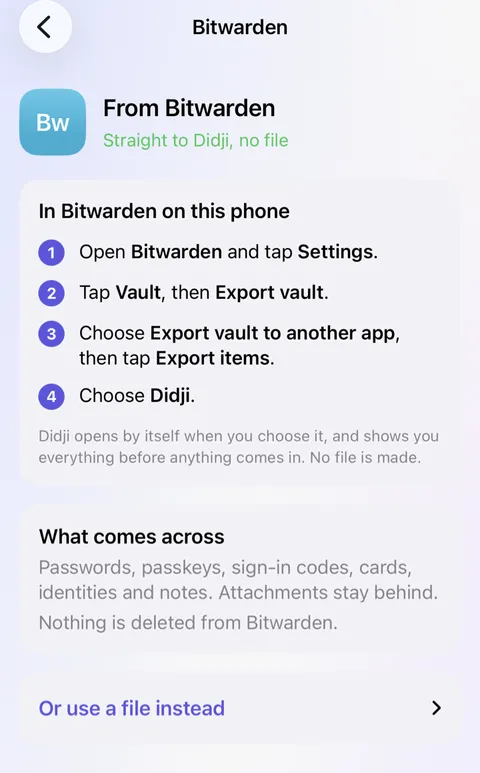
- Sent straight from Bitwarden, each login comes with its passkeys, sign-in codes and favourite, and each card, identity, secure note and SSH key becomes a record of its own kind.
- An identity becomes a Person record in People & ID. To give someone a page in People & Places, open their record and set Type to Person.
- Attachments stay in Bitwarden: the way apps hand things to each other has no room for files. Add the ones that matter as scans.
- From a file instead, logins and secure notes come across: each folder as a tag, custom fields as hidden fields, and an authenticator key as a working sign-in code. Cards, identities and passkeys aren't in Bitwarden's file, and nor is anything an organisation owns.
- Nothing is copied twice. Sent straight from the app, a login already in Didji is merged with it, and where two passwords differ, the newer is used and the other kept on the same record. From a file, a login already here with a different password is kept beside it as a second record, and Didji says so: one of the two is probably out of date.
- Everything shows under Recently added for 30 days, dated the day you moved.
New in Didji for you
- One purchase, no subscription and no account. Your vault lives on your own devices and in your own iCloud, locked before it leaves them; see Paying once.
- Sign-in codes are part of every login, filled by AutoFill and shown on your Apple Watch; see Sign-in codes.
- A page for every person, pet, car and home, with everything that belongs to them and what's due; see People & Places.
- Essentials shows what people usually keep, and which of it isn't in Didji yet; see Essentials.
- Moved house or changed your email? I’m changing this everywhere finds every record holding the old one and takes you through them; see Changing an address, a number or an email.
- Search reads inside your scans and PDFs, so a word printed on a letter is found too; see Finding things.
- Private Photos keeps photographs and videos in the vault, away from your camera roll; see Private Photos.
- Templates researched for your own country, from a V5C to a Personalausweis, with reminders before anything expires; see Categories and templates.
What works differently
- Sharing is with people, a record at a time: a shared record goes only to someone you've connected with in Didji, and only you can change it. There are no organisations to run, and the people you share with don't need to buy Didji; see What is shared, and what is not.
- Nothing in Didji leaves as a link, so there's nothing like Send.
- Exposure Check looks for your passwords themselves in known breaches, and never sends your email address anywhere to be checked; see What leaves your device.
- A login fills on every website it names, matched by the site, without settings for each address.
- Didji is for iPhone, iPad and Mac, and fills through Apple's own AutoFill rather than a browser extension; see Filling in passwords for you.
- Nobody, us included, can reset your way in. Your recovery kit is the way back; see What we can't do for you.
See also
Still stuck?
Write to us at hello@didji.app, and tell us which device you’re using if you can.
Never send a password or your recovery code to anybody, us included. What we can’t do for you.