Help
Coming from Dashlane


Your logins, cards and IDs are here, and anything deleted waits a month before it's gone.
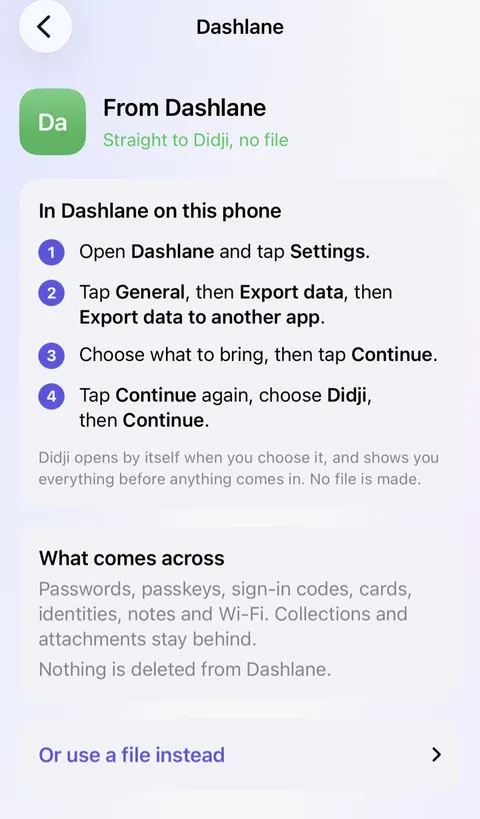
In Didji: Move to Didji
Where things are
- Logins and Passkeys: logins, with their passkeys
- Secure Notes: Secure note records, in Notes
- Payments: Payment card and Bank account; see Payment cards
- IDs: templates of their own, many made for your country: Passport, Driving licence, Identity card and more; see Categories and templates
- Personal Info: your own Person record, with your page in People & Places; see People & Places
- Wi-Fi: Wi-Fi network, shown as a QR code for a guest; see Wi-Fi
- Collections: categories and tags; see Vaults in Didji
- Password Health: Exposure Check, with the accounts in good shape at the top, and Found in breaches, Reused and Weak; see Exposure Check
- 2FA tokens: sign-in codes, filled by AutoFill; see Sign-in codes
- Secure file storage: scans, photos and PDFs inside any record; see Keeping a scan or a photograph inside a record
- View history: History on every record, and Previous passwords; see Earlier versions of a record
- Expires soon: Due soon, and a reminder on any date you choose; see Reminders and Due soon
- Sharing Center: sharing chosen records with people you've connected; Hide passwords from… lets them fill without seeing; see What is shared, and what is not
- Friends & Family: one purchase for your Family Sharing group, and sharing with up to 20 people, who don't need to buy Didji; see Paying once
- Master Password and recovery key: nothing to remember: the key is kept in your iCloud Keychain, Face ID opens Didji, and your recovery kit is on paper; see Your recovery kit
What came across
- Sent straight from Dashlane, each login comes with its passkeys and 2FA token, and each card, ID, secure note and Wi-Fi network becomes a record of its own kind.
- Personal info becomes a Person record in People & ID. To give someone a page in People & Places, open their record and set Type to Person.
- Collections don't come across, as Dashlane leaves them out: everything arrives in one vault, sorted into categories.
- Files attached to secure notes stay in Dashlane: add the ones that matter as scans.
- From a file instead, only logins come across, from the file called credentials, with their 2FA tokens; a second and third username arrive as more Username fields. Didji names Dashlane's other files, which it doesn't read.
- Nothing is copied twice. Sent straight from the app, a login already in Didji is merged with it, and where two passwords differ, the newer is used and the other kept on the same record. From a file, a login already here with a different password is kept beside it as a second record, and Didji says so: one of the two is probably out of date.
- Everything shows under Recently added for 30 days, dated the day you moved.
New in Didji for you
- One purchase, no subscription and no account. Your vault lives on your own devices and in your own iCloud, locked before it leaves them; see Paying once.
- Deleted something by mistake? It waits in Recently Deleted for 30 days; see Archiving and deleting.
- A page for every person, pet, car and home, with everything that belongs to them and what's due; see People & Places.
- Essentials shows what people usually keep, and which of it isn't in Didji yet; see Essentials.
- Moved house or changed your email? I’m changing this everywhere finds every record holding the old one and takes you through them; see Changing an address, a number or an email.
- Search reads inside your scans and PDFs, so a word printed on a letter is found too; see Finding things.
- Private Photos keeps photographs and videos in the vault, away from your camera roll; see Private Photos.
- Any record printed, or a blank form of any template; see Printing a record.
What works differently
- Sharing is with people, a record at a time: a shared record goes only to someone you've connected with in Didji, and only you can change it. The people you share with don't need to buy Didji; see What is shared, and what is not.
- Exposure Check looks for your passwords themselves in known breaches, and never sends your email address anywhere to be checked; see What leaves your device.
- The way in for your family is your recovery kit on paper, with its page for them; see So that my family can find things.
- Didji is for iPhone, iPad and Mac, and fills through Apple's own AutoFill rather than a browser extension; see Filling in passwords for you.
- Nobody, us included, can reset your way in. Your recovery kit is the way back; see What we can't do for you.
See also
Still stuck?
Write to us at hello@didji.app, and tell us which device you’re using if you can.
Never send a password or your recovery code to anybody, us included. What we can’t do for you.